
Choosing a MobileEyes alternative means choosing where your department's inspection work will live for years. An annual visit, a blocked exit, a notice to the property manager, and the return visit should form a history the next inspector can follow.
Command Established is worth evaluating when you want that inspection workflow alongside the rest of your department's operations. You can manage inspection forms and recurring programs, record findings and photos, sign completed inspections, and issue documents from the same application you use for permits, pre-plans, and incident records.
MobileEyes is now presented as Fire Prevention Mobile on its product website. Tyler describes a cloud-based suite for inspectors, engine companies, first responders, and system contractors, with third-party integrations. Those are real capabilities to consider when choosing a replacement. Read Tyler's product overview.
Compare the Work Your Department Needs to Do
The products overlap in fire prevention and pre-planning. The useful comparison is how each handles your forms, follow-up work, property communication, and connections to the systems you already use.
| Command Established | Tyler Fire Prevention Mobile | |
|---|---|---|
| Fire prevention work | Department inspections, published forms, recurring programs, signed completion records, certificates, and notices. Explore inspections. | Mobile applications for fire marshals, life safety inspectors, engine companies, first responders, and system contractors. Tyler brochure. |
| Pre-plans | Building details, hazards, tactical maps, photos, and nearby hydrants. Explore pre-plans. | Pre-Plans Mobile covers building safety details and documents connections to CAD, Enterprise Public Safety, and Enterprise Permitting & Licensing. Tyler module sheet. |
| Department operations | Inspections, permits, incidents, training, inventory, and other department modules included in one subscription. See all features. | Tyler's broader Fire & EMS Suite spans prevention, dispatch and response, and reporting. Confirm the products and integrations included in your proposal. Tyler suite overview. |
If contractor submissions or a particular Tyler integration are central to your operation, bring that requirement to the demo. A department inspection workflow alone does not establish that those other processes will fit.
From a Finding to a Clear Correction
Here is a practical evaluation scenario: an inspector at Pacific Rim Shopping Center finds delivery pallets narrowing a rear exit corridor. The property manager needs to know exactly where the problem is, what to correct, and when the department will follow up.
In Command Established, the inspector records the finding and supporting photos, then completes and signs the inspection. From that completed record, the inspector prepares a notice using a published department template, selects the finding, and adds the citation, required correction, and deadline. The populated PDF is reviewed before it is issued.
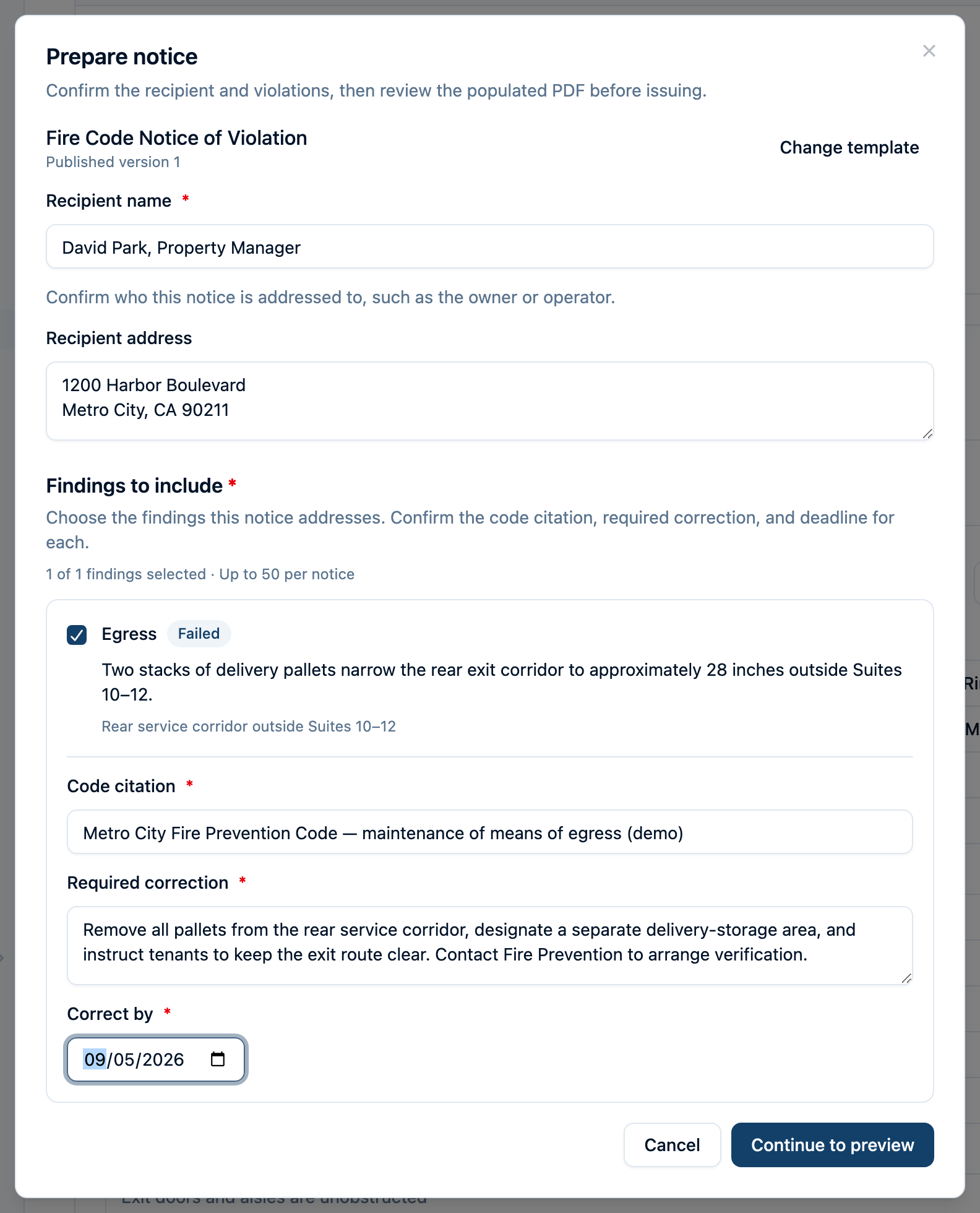
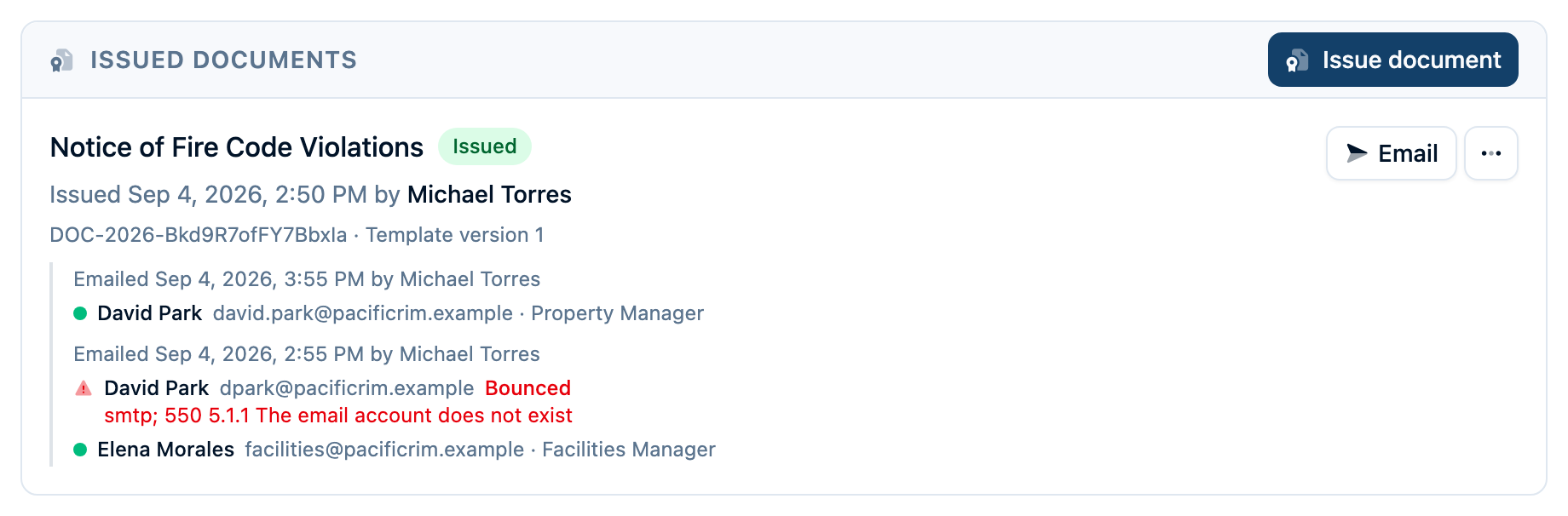
Issuing the document saves its PDF and document number with the inspection. Sending is a separate action: choose the recipients, add an optional note, and email the saved PDF. The property owner can read the attachment without creating an account.
Delivery history stays with the document, including failed sends and bounces. The team can correct an address and send again while retaining the earlier attempt.
Schedule a linked reinspection from the failed inspection and choose whether to carry forward unresolved findings. The return visit has its own record, connected to the original. Read the complete fire inspection workflow, or follow the certificate and notice guide to see each action.
Your Forms and Your Inspection Schedule
An annual business inspection and a kitchen hood inspection need different questions. Build department forms with sections, answer types, photo requirements, and reference notes. Publish a version when it is ready for inspectors; the version used for a visit remains part of that inspection's record. An existing PDF checklist can also provide a draft for your team to review and publish. See how inspection forms work.
Your department supplies its code citations and reference links. Command Established does not include a licensed IFC or NFPA code library, validate your adopted code, or choose the correct citation for you. Use the edition, amendments, and content your department is authorized to use.
For recurring work, create an inspection program, select the form and cadence, and enroll the relevant properties. The work queue gives staff a place to review due visits and schedule the work. That keeps the recurring program separate from the linked follow-up visits needed to verify corrections. Explore inspection programs.
Inspectors can use Command Established on a tablet, but offline access is read-only. Previously cached information remains available to view. Saving inspection work, completing and signing a visit, and issuing or emailing documents require a connection. Include your actual field connectivity in the trial. Review offline access.
Moving from MobileEyes Without Starting Over
We have a support-assisted migration process for MobileEyes occupancies and historical inspection results. The scope starts with your exports and the records you need to preserve.
- Review the available records. Work with our team to identify your occupancy roster, inspection history, individual results, and findings.
- Match the people and properties. Reconcile addresses, occupancy identifiers, inspector names, and records that do not match cleanly.
- Check the imported history together. Review the record counts and representative passed and failed inspections, including their findings and original source information.
- Agree on the remaining work and cutover. Document any gaps and prepare the forms, recurring programs, and assignments your team will use for new inspections.
Historical records retain their imported origin. They do not become newly signed Command Established inspections, and imported inspections cannot issue new certificates or notices through the current document workflow. Photos and original signatures may not be present in the source reports; our team will identify those limits with you. Any department checklist or code-derived content also needs review before it is brought over.
Talk with us about your MobileEyes exports so the migration plan reflects the data you actually have.
Published Pricing, With Room for the Whole Department
Command Established is $1,736 per year for up to two stations, with unlimited users and all modules included. Each station beyond two adds $1,736 per year. Inspectors, officers, and other department members can work in the same subscription without a separate per-user charge. View current pricing.
Compare that with a current Tyler proposal covering your actual requirements: inspection users, contractor workflows, pre-plan access, integrations, implementation, and ongoing support. This page does not estimate Tyler's price or assume which services your agreement includes.
Give Both Products the Same Walkthrough
Bring a representative property and one of your department's inspection forms. Ask to see the visit scheduled, a finding documented, a notice reviewed and emailed, and a reinspection linked to the original. Then review what the next inspector and the property owner can see.
If your department relies on Tyler's wider environment, its documented integration options deserve close attention. For example, its Pre-Plans Mobile module sheet describes connections to CAD, Enterprise Public Safety, and Enterprise Permitting & Licensing. Confirm the exact connection you need with each vendor.
If you want to bring prevention work into the same application as your department's daily records, start with our inspection overview and the full workflow. Then try your own forms and properties during the 30-day trial, with no credit card required.
Start Free Trial | Schedule an Inspection Demo
Frequently Asked Questions
Is MobileEyes the same product as Fire Prevention Mobile?
MobileEyes is the name many departments still use. The mobile-eyes.com site identifies the product as Fire Prevention Mobile, and Tyler publishes its current product and support material under that name. This page uses both names to help departments evaluating their next inspection system.
Can you move our MobileEyes inspection history?
Our team can help import occupancies and historical inspection results from suitable exports. We review the source records, match properties and inspectors, and identify missing information with you before cutover. Photos, signatures, and other material absent from the export need separate review. Contact us about your migration.
Does Command Established include a fire code library?
No bundled licensed code library is included. Your department can add its own citations and reference links to inspection questions and notices. You choose the applicable code edition, amendments, and wording and provide content you have the right to use. See the inspection form guide.
Can inspectors complete inspections without a connection?
Command Established's offline access is read-only. Previously cached information can be viewed, but saving inspection work, completing and signing an inspection, and issuing or emailing documents require a connection. See what is available offline.
Sources reviewed September 20, 2026. Tyler product details above come from the public sources linked beside the claims; confirm current offerings and contract scope with Tyler. Command Established is independent of Tyler Technologies. MobileEyes, Fire Prevention Mobile, and other product names belong to their respective owners and are used for identification and comparison. Tell us about a correction.