
Log Books: Written Entries, Report Forms & Shift Pass-Ons
Use Written entries for station journals, shift pass-ons, and announcements. Use Form when every entry should answer the same questions, such as an accident, injury, exposure, or near-miss report. Both formats organize records into log books with dated entries and access appropriate to the work.
Choose Written Entries or a Form
| Choose | When to use it | How entries work |
|---|---|---|
| Written entries | A running journal, pass-on, or notice | Members write rich text, add photos and @-mentions, and optionally request an acknowledgement. A book template can pre-fill the editor. |
| Form | A repeatable report with required answers | Owners and admins publish a form. Submitters fill in a private draft and post a final report. Questions can depend on earlier answers. |
A book's entry format is fixed at creation. Create a separate Form book when introducing a reporting process; existing written books keep their entries and templates.
For a complete example, see Build an incident or accident report form. It follows the Metro City demo's Accident & Injury Reports book from access settings to a posted report.
Choosing the Right Scope
Every log book is tied to a scope that determines how it's organized and filtered. Scope is an organizational category, not an access rule: a book can be department-, station-, apparatus-, or shift-scoped and independently be visible to the whole department or restricted to a smaller audience.
- Department — for announcements, policy updates, and information that crosses station boundaries.
- Station — for station-specific activity logs, building maintenance notes, and local information. Members can filter the log book list by station.
- Apparatus — tied to a specific rig. For apparatus-specific notes, recurring issues, and equipment status that travels with the unit.
- Shift — tied to a platoon and optionally a station. For shift pass-on reports where the outgoing crew hands off to the incoming crew.
The scope type is locked when you create the book — you can't change a station book into an apparatus book or vice versa. However, you can change which station, apparatus, or platoon the book is tied to after creation (e.g., move a station book from Station 1 to Station 2).
Creating a Log Book
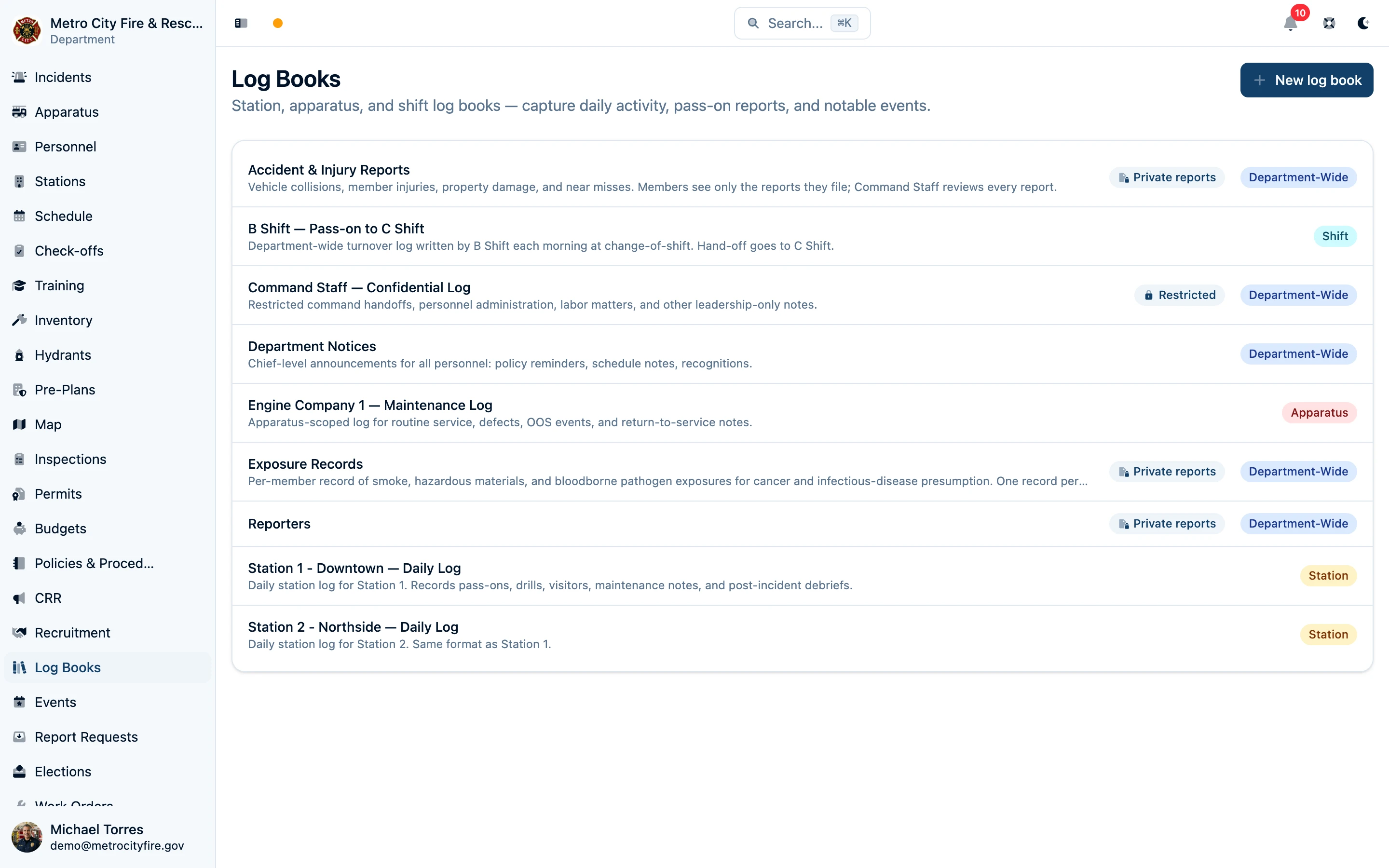
- Go to Log Books in the sidebar and click New log book.
- Give it a clear name, such as Station 1 Daily Log or Accident & Injury Reports, and optionally add a description.
- If you are an owner or admin, choose Written entries or Form under Entries. The Form option is available only to owners and admins.
- Choose the Scope and its associated station, apparatus, or platoon, if applicable.
- Set the access rules. Written books use editor/viewer lists; Form books have separate submission and report visibility settings, described below.
- Create the book. A new Form book opens its Form page so you can build and publish the questions before members submit entries.
Form Books: Submission and Review Access
Owners and admins configure two independent settings:
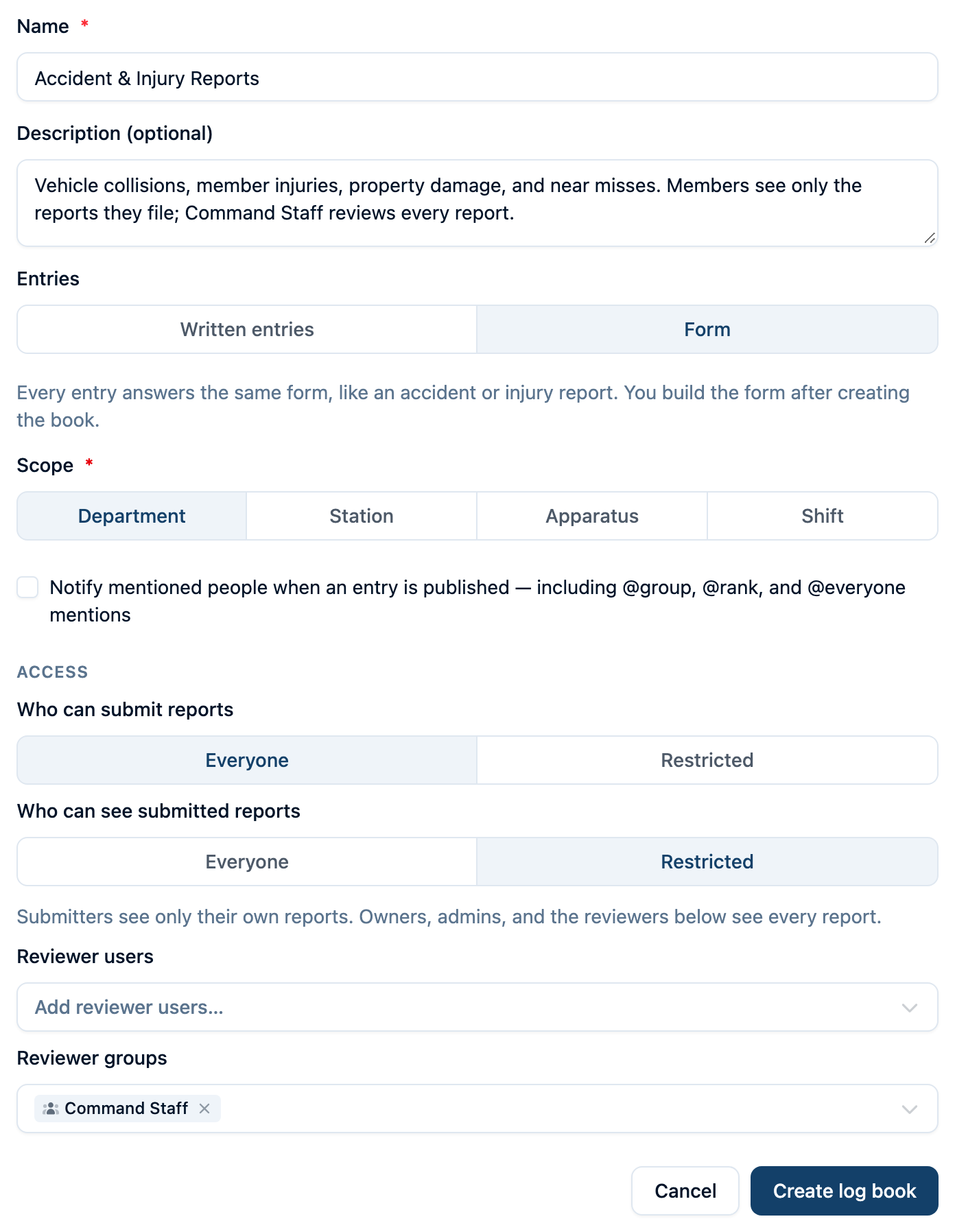
- Who can submit reports — Everyone allows every department member to file. Restricted allows owners, admins, and the selected Submitter users and Submitter groups.
- Who can see submitted reports — Everyone allows department members to read all reports. Restricted allows submitters to see their own reports; owners, admins, and selected Reviewer users and Reviewer groups can see all reports.
Choosing Form starts with submission set to Everyone and submitted reports set to Restricted. A practical accident-report setup is to let every member file while adding Command Staff as a reviewer group. A person named in an answer does not gain access to that report merely because they are mentioned in its fields.
Form books use these submission settings rather than department-wide log entry write permissions or written-book editor lists. Review access alone does not grant submission access when the submitter list is restricted.
Build and Publish a Form
Open the book's Form page and choose Edit form if a draft is not already open. Owners and admins can author the form.
- Enter a Title and optional instructions.
- Use Add section, then Add to section to add questions, instructions, or a repeating group.
- Choose the answer type and mark required questions. Available types include short and long text, numbers, Yes/No, single and multiple choice, dates, times, and personnel or apparatus selectors.
- Add conditions where they help. An earlier choice or Yes/No answer can control whether a question, section, or repeating group appears.
- Switch to Preview and try the branches. Preview answers are only for testing the form; they do not create an entry.
- Use Save draft to preserve form edits. Choose Publish, resolve any validation messages, then confirm Publish to make the version available to new reports.
Saving a form draft does not publish it. Publishing creates a numbered version listed under Published versions. New report drafts use the current published version; drafts already started keep their original version. Later form edits do not change posted reports.
Start From an Existing Form
If the form already exists on paper or as a PDF, choose Import (or Import a form on an empty draft) and upload a PDF, a screenshot, or a photo of the page. On a phone, you can take the photo directly. AI reads the form and builds sections, questions, answer types, repeating groups such as witness tables, and the follow-up conditions the form spells out.
Before anything changes, the import shows what it found and lists everything to check against the original: fields it could not bring across (such as signature lines), text it shortened, and conditions it could not match. Choose Use this form to load it into the builder. The list stays above the builder until you dismiss it.
Importing replaces the whole draft rather than adding to it, and nothing is saved until you choose Save draft. Review every question against the original, then preview and publish as usual. On a form that is already published, imported questions start new questions; reports filed against earlier versions are unchanged.
Complete and Post a Form Report
- Open the Form book and click New entry.
- Check When did this happen? and enter the occurrence time in your department's timezone.
- Answer the questions. Additional sections or follow-ups appear when their conditions match; required answers are marked.
- Check the save status. Answers autosave to your private draft; Save draft also saves immediately. Resume later from Your unfinished draft in the book. Drafts stay out of the posted-entry list and search. Reviewers cannot open another person’s draft unless they are an owner or admin.
- Recheck your answers and choose Review & submit. Missing or invalid answers must be fixed before posting. If changed answers hide a previously completed question, the confirmation identifies those answers as excluded.
- Choose Post to submit the final entry, or Keep editing to return to the draft.
Posted form reports cannot be edited. The report keeps the questions and applicable answers from the version used to submit it. Reviewers open submitted entries in the book; “reviewer” gives access to read reports and does not add an approval step.
Form reports use structured fields rather than the written-entry editor. They do not offer inline photos, @-mentions, or a request-acknowledgement control. Recording an Officer notified answer documents a notification; it does not send one.
Follow the accident report walkthrough with screenshots →
Restricting a Written Log Book
Most operational books should remain visible to the whole department. For command handoffs, personnel administration, labor matters, or another running log with a narrower audience, an owner or admin can set Who can see this book to Restricted.
A restricted book and all of its entries are visible only to:
- Department owners and admins
- Users and groups listed as Editors (write access also implies view access)
- Users and groups listed as Viewers
Other members do not see the book in the Log Books list, search, dashboards, recently viewed items, mention back-references, or notifications. A direct link returns the same unavailable result as a book that does not exist, so its title and existence are not disclosed. Announcement entries from a restricted book also stay off station-board displays.
Department-wide log entry permissions do not make a restricted book visible. A member must first be an owner/admin, an editor, or a listed viewer. Once the member can see the book, their normal department permissions still apply; the per-book editor list is the exception that grants entry create/update access for that book alone.

Important: Restricted controls access inside Command Established. It does not change your department's retention, public-records, labor, discovery, or disclosure obligations.
Writing in a Written Log Book
Open a written log book and click New entry to compose. Each entry includes:
- Rich text body — full formatting support including headings, lists, tables, bold, italics, links, and block quotes. Drag and drop or paste images directly into the entry.
- Entry date and time — defaults to now, but you can backdate if you're catching up on a previous day's notes.
- Entry type — categorize the entry so it's filterable later:
- Note — general observations and routine activity
- Pass-on — shift turnover handoffs
- Drill — training notes and evolutions
- Maintenance — equipment and facility issues
- Incident follow-up — post-incident debriefs and notes
- Announcement — department-wide notices
Using @-Mentions
Type @ in the editor to link to people, apparatus, incidents, trainings, work orders, SOPs, pre-plans, hydrants, and more. Mentions create two-way references — the mention links to the referenced item, and that item's record shows a back-reference to your log entry.
When mention notifications are enabled on the book (the default), mentioned members who can see the book receive a notification so they know to read the entry.
Notifying a whole group, rank, or everyone
Sometimes the point of an entry is to make sure a set of people sees it, not to link to a record. Instead of tagging members one by one, type @ and pick from the Groups, Ranks, or Everyone categories in the popup, or just start typing a group name, a rank like @lieu, or @ev and the matching broadcast target appears at the top of the suggestions.
@a group — notifies every member of that group (for example,@Duty Officersor@Engine 2 Crew). The popup shows each group's roster size; the number actually notified can be smaller, since you, inactive members, and anyone who can't see the book are skipped.@a rank — notifies everyone whose primary rank is that rank (for example,@Lieutenant). Personnel who hold the rank only as a secondary rank are not notified, even though the popup's count includes them.@Everyone— notifies every active member of the department. Because this reaches the whole department, the editor pauses before saving with a Notify N people? confirmation. The count it shows is every active member except you; on a restricted book the number actually notified is smaller, because members who can't see the book are skipped. Group and rank mentions save without the extra confirmation.
Example — Department Announcements. The chief needs all officers to know about a new mutual aid procedure before the weekend. In the Department Announcements book she writes an Announcement entry, mentions @Captain and @Lieutenant, and sets the acknowledgement control to Everyone mentioned acknowledges. Every captain and lieutenant is asked to acknowledge the entry, and the chief can see which officers have and which still haven't (see Acknowledgements from everyone mentioned).
Who actually gets notified. Broadcast mentions follow the same rules as mentioning a single person:
- The book's Notify mentioned personnel setting must be on (it is by default). Turn it off and broadcast mentions become plain labels.
- Only active department members are notified. People who have been removed from the department are skipped, including when a group roster still lists them. Direct and
@rankmentions also skip archived personnel;@Everyoneand group mentions go by department membership, so an archived person who is still an active member is still notified. Archived groups don't notify anyone. - On a restricted book, only people who can see the book are notified.
@Everyoneon a restricted command log reaches the book's authorized audience, not the whole department. - You never notify yourself.
- Each person gets one notification per save, even if they're covered by several mentions in it. (A later edit that adds a new group or rank notifies that audience again, including people already reached by an earlier mention.) If you're mentioned directly by name, your notification says "You were mentioned in …"; otherwise it names the broadcast, such as "@Everyone was mentioned in Daily Log."
- Notifications go out when a broadcast mention is first added. Editing an entry that already contains
@Everyone(or a group or rank) doesn't re-notify; adding a new broadcast mention to an existing entry notifies only that new audience.
Broadcast mentions and read acknowledgements pair well: the mention gets the entry in front of people, and the acknowledgement control records that they've read it — either the first reader, or each person mentioned.
Inline Images
Drag and drop photos directly into the entry body, or paste from your clipboard. This is useful for documenting conditions — a photo of a damaged hose coupling, a whiteboard diagram from a training session, or the state of a piece of equipment.
Shift Pass-Ons and Read Acknowledgements
The pass-on workflow is one of the most valuable uses of log books. Here's how it works:
- Create a shift-scoped log book tied to a platoon (and optionally a station)
- Outgoing crew writes a pass-on entry summarizing what happened during their shift — calls, apparatus issues, tasks left incomplete, anything the incoming crew needs to know
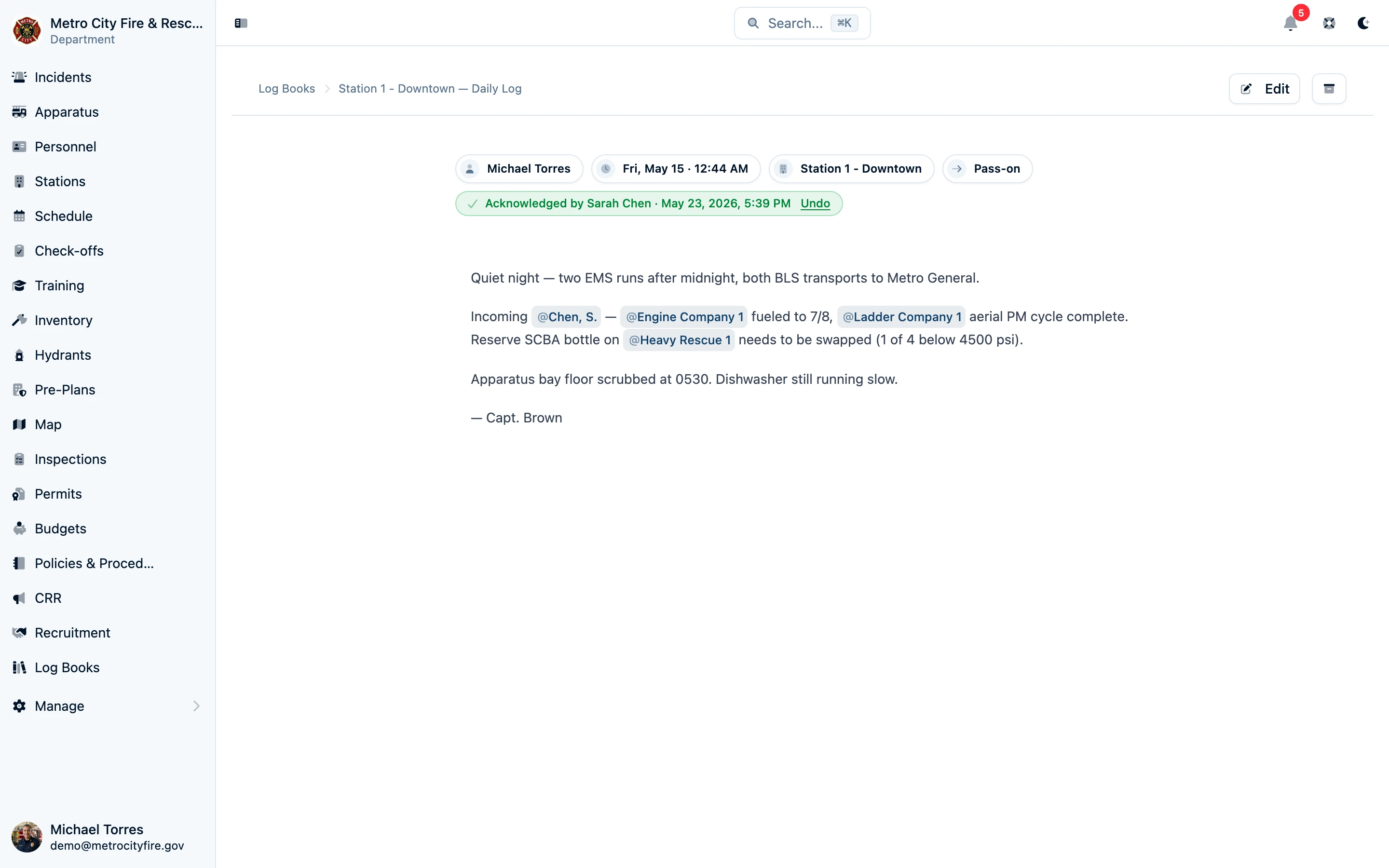
- Set the acknowledgement control to "First reader acknowledges" on the entry (this is chosen automatically for shift-scoped books and pass-on entry types)
- Incoming crew reads the entry and taps Acknowledge to confirm they've read it
The acknowledgement is a read receipt, not a legal signature — it records who acknowledged and when, creating a clear record that the information was received. Officers can see at a glance whether pass-ons have been acknowledged.
Tip: If your department doesn't use formal platoons, you can still use the pass-on workflow with a station-scoped book. The acknowledgement feature works in any written book — just choose an acknowledgement option when you write the entry.
Acknowledgements from everyone mentioned
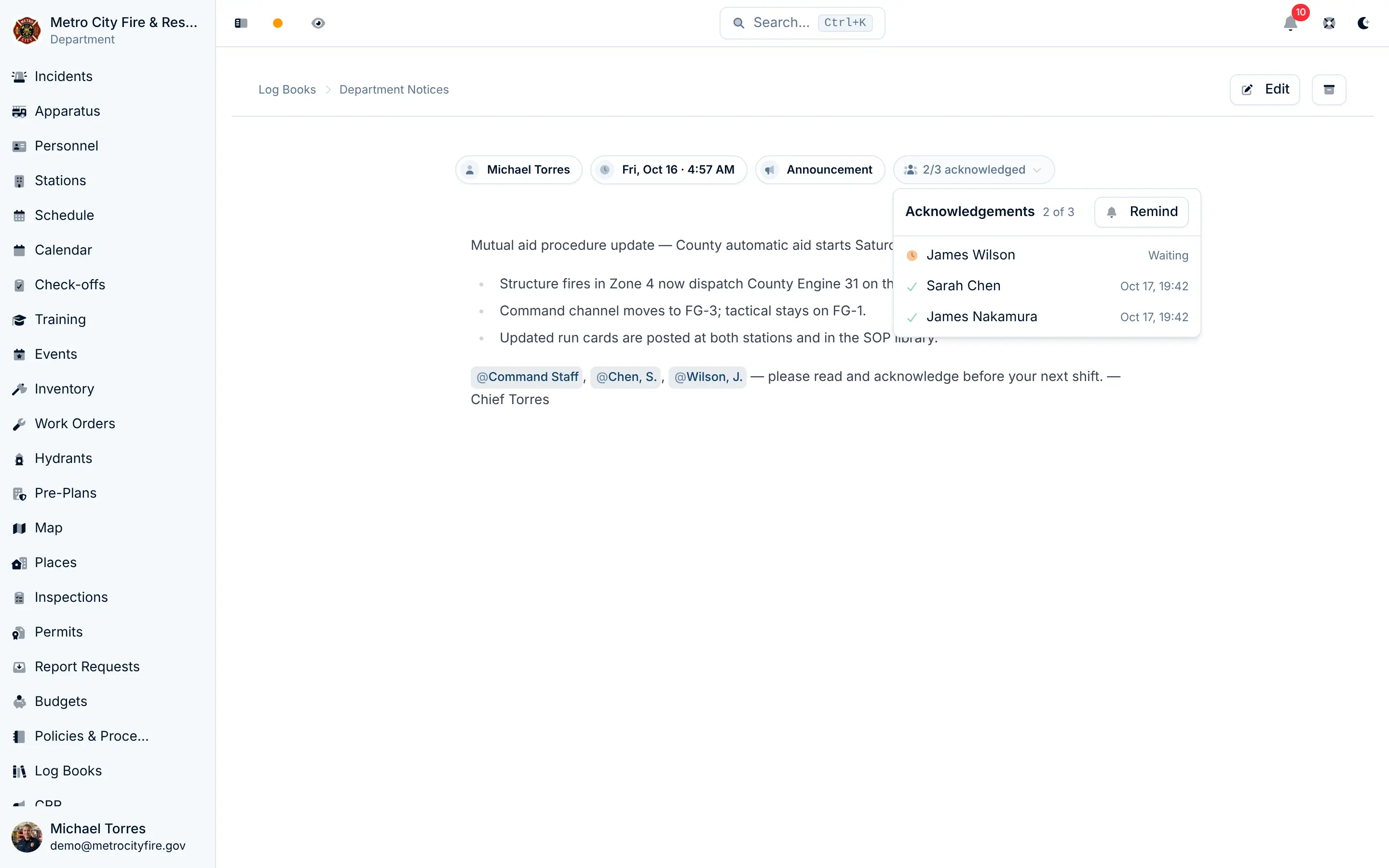
The acknowledgement control above the entry body has three settings: No acknowledgement (the default), First reader acknowledges, where the first person to tap Acknowledge closes it out, which suits a pass-on to one incoming officer, and Everyone mentioned acknowledges, for an announcement that every officer must read:
- Write the entry and @-mention who needs to read it — people by name, a group, a rank, or
@Everyone - Set the acknowledgement control to Everyone mentioned acknowledges
- Save. Everyone the mentions cover gets an Acknowledgement requested notification (even if the book's mention notifications are off). You aren't asked to acknowledge your own entry.
Each person taps Acknowledge on the entry. Their acknowledgement is recorded with the time and can't be withdrawn. Pending entries also appear in the My pending acknowledgements dashboard widget.
The entry shows an "N/M acknowledged" badge. For the author and admins, clicking it lists who has acknowledged (with the time) and who is still waiting, with a Remind button that re-notifies only the people who haven't (at most once an hour).
Who is asked is fixed when the request is made — joining a group later doesn't add you to an existing announcement. Editing the entry updates the list: adding a mention asks the newly covered people, and removing one drops the people it covered who haven't acknowledged yet. Acknowledgements already recorded are kept.
Written Entry Templates
For a Written entries book, templates pre-fill the editor; they do not create required questions or validation. If your crews write the same kind of entry repeatedly — a daily activity summary with the same sections, a shift pass-on with standard categories — set up a template on the book so new entries start pre-filled.
- Open the log book and click Edit
- Choose Add template, or open the existing template
- Build out the template using the same rich text editor — add headings, sections, placeholder text, or a checklist structure
- Save
Every new entry in that book will start with the template content. Members can edit freely from there — the template is a starting point, not a constraint.
Example: Station Daily Log Template
## Shift Summary
[Summarize activity, calls, and notable events]

## Apparatus Status
[Note any issues, out-of-service rigs, or maintenance needs]

## Facilities
[Building issues, supply needs, cleaning tasks]

## Pass-On Items
[Anything the next shift needs to know or follow up on]
Controlling Who Can Write in a Written Book
For a department-visible written book, any member with the department-level log entry permission can write. For members who do not have that department-wide permission, you can grant write access to specific books with a per-book editor list.
- Open the log book and click Edit
- Under Editor permissions, add specific users or groups who should be allowed to write in this book
- Save
The editor list adds write access — it does not take department-level permission away. On a restricted book, however, visibility is checked first: a department-wide writer who is not an owner/admin, editor, or listed viewer cannot discover or write in the book. Editors automatically receive visibility, so adding someone as an editor is enough to let them open and write in that one book.
Finding What You Need
Within a Book
The entry listing supports:
- Search — search written content and mention labels, or question labels and answers in submitted forms, within the records you can access.
- Filter by entry type — written books can narrow to pass-ons, maintenance notes, and other types. Form books do not show this filter.
- Filter by author — narrow entries by their author. Members who can see only their own form reports do not need this filter.
- Date grouping — entries are grouped by calendar day (Today, Yesterday, then dates) for easy scanning.
Across Books
When you view a personnel record, apparatus detail, or other entity, a Mentioned in section shows the accessible log entries that @-mention that item across the department. Restricted entries remain absent for viewers outside the book's audience.
Common Setups
Accident or Injury Report Book
| Setting | Example |
|---|---|
| Entries | Form |
| Scope | Department |
| Who can submit reports | Everyone |
| Who can see submitted reports | Restricted, with Command Staff as a reviewer group |
| Form | Occurrence details, conditional injury/collision questions, witnesses, narrative, and supervisor notification |
Members file consistent reports while seeing only their own submissions. See the worked example.
Station Daily Log
Scope: Station Template: Shift summary, apparatus status, facilities, pass-on items Entry types used: Note, maintenance, incident follow-up Acknowledgement: Optional — useful if officers want to confirm they've reviewed daily activity
Shift Pass-On Book
Scope: Shift (tied to a platoon and station) Template: Calls run, apparatus issues, tasks in progress, incoming crew action items Entry types used: Pass-on Acknowledgement: Always — incoming crew acknowledges to confirm handoff
Department Announcements
Scope: Department Writers: Chiefs and admin staff, using department permissions and any additional per-book editors Entry types used: Announcement Acknowledgement: Optional — useful for policy changes where you need confirmation that members have read the update
Restricted Command Log
Scope: Department Visibility: Restricted to owners/admins, the command-staff editor group, and any specifically listed viewers Entry types used: Note, pass-on Acknowledgement: Useful for duty-chief handoffs and time-sensitive follow-up Use case: A leadership running log that stays out of department search, shared dashboards, and member notifications unless the viewer is authorized
Apparatus Log
Scope: Apparatus (tied to a specific rig) Entry types used: Maintenance, note Acknowledgement: Rarely needed Use case: Ongoing notes about a rig's condition, recurring issues, quirks that crews should know about — complements the formal work order system with informal institutional knowledge
Frequently Asked Questions
Can I change a log book's scope after creating it?
You can change which station, apparatus, or platoon a book is tied to, but you can't change the scope type (e.g., convert a station book into an apparatus book). If you need a different scope type, archive the old book and create a new one. Archived books and their entries remain readable to their authorized audience for reference.
Can I delete a log entry?
Entries are archived, not deleted — they remain in the system for audit and compliance purposes. Archived entries can be restored by an admin or the department owner.
Who can acknowledge an entry?
Any member with read access to the log book can acknowledge an entry that requests it. You don't need edit permission — the acknowledgement is a read receipt, not an edit.
Can I undo an acknowledgement?
It depends on the setting. On a First reader acknowledges entry, yes: the member who acknowledged can clear their own acknowledgement, and admins or the department owner can clear any acknowledgement. On an Everyone mentioned acknowledges entry, no: each person's acknowledgement is permanent and can't be withdrawn by anyone.
Is there a limit on how many images I can add to an entry?
Each written entry supports up to 50 inline images. Form reports do not offer image uploads. Individual images can be up to 10 MB each, and JPEG, PNG, and WebP formats are supported. HEIC photos (from iPhones) are automatically converted to JPEG.
How do mention notifications work?
When a log book has "Notify mentioned personnel" enabled (the default), an @-mentioned member receives a notification only if they can see the book. You can disable notifications per book if the mentions are for reference rather than alerting.
I'm a captain — how do I notify all Lieutenants about a pass-on without tagging each one?
In the entry body, type @ and choose Ranks from the popup (or just type @lieu), then pick Lieutenant. Active department members with Lieutenant as their primary rank who can see the book are notified when you save. Set the acknowledgement control to Everyone mentioned acknowledges to track which lieutenants have read it; First reader acknowledges records only one person's acknowledgement. No confirmation dialog appears for a rank mention — that's only for @Everyone.
Does @Everyone notify people who can't see the book?
No. On a restricted book, @Everyone only notifies owners, admins, editors, and listed viewers — the same people who can open the book. The confirmation dialog's count is the department-wide number of active members, so on a restricted book the actual number notified is smaller. On a department-visible book, @Everyone reaches every active member. Former members are not notified. Everyone and group broadcasts use active department membership, so an archived personnel record can still receive one if its user remains an active member.
Can I combine a broadcast mention with a read acknowledgement?
Yes, and it's the recommended way to handle policy changes and department-wide pass-ons. Mention @Everyone, a group, or a rank so the right people are notified, and set the acknowledgement control to Everyone mentioned acknowledges so you have a record of who has read the entry. First reader acknowledges works on any written entry, whether or not it mentions anyone, and anyone with read access to the book can give it.
Does Restricted change whether a record must be retained or disclosed?
No. Restricted is an application access control for day-to-day use. Your department's retention schedule and any public-records, labor, discovery, subpoena, or other disclosure obligations still apply.