
One System for Every Meeting, Standby, and Detail
Departments run on far more than calls and drills. Monthly business meetings, standbys at the high-school game, the Memorial Day parade, a line-of-duty funeral, the pancake-breakfast fundraiser, a Saturday work detail at the station — they all take people's time, and in a volunteer or combination department that time has to be counted. Command Established gives you one place to schedule those events, take attendance, and turn participation into Length of Service Award Program (LOSAP) credit your board can actually report on.
Track Every Event That Counts
Create an event for any of the activities your department runs outside of training and incident response:
- Meetings — business meetings, officer meetings, committee meetings
- Standbys — game-day, festival, and special-event coverage
- Parades — community parades and processions
- Funerals — line-of-duty and honor-guard details
- Fundraisers — pancake breakfasts, boot drives, banquets
- Community service — school visits, station tours, public education events
- Work details — station and apparatus work parties, grounds, and projects
- Fire police details — planned traffic and crowd control for road races, carnivals, and neighboring towns
- Other — anything else your department needs to log and credit
Each event records its type, a scheduled date and time, a duration, and either a station or a free-text location for off-site activities. (Drills and training keep their own home in the Training module, so your participation records stay clean and your LOSAP categories don't get muddled.)

The events list — every meeting, standby, detail, and fundraiser in one place, tagged by type and status with the attendee count for each.
Turn Attendance Into LOSAP Credit
Open an event and record who showed up. For events where time on task is what matters — standbys, work details, fire police details, fundraisers, and community service — you can log minutes completed per member, not just a checkbox, with room for a note next to each name. For the rest — meetings, parades, funerals — attendance is the credit: one entry per member who participated.
That split mirrors how most LOSAP point systems actually work: a flat point for showing up to a meeting, and hour-based accrual for the standby you covered for six hours. Every attendee is recorded once, attributed, and tied to the event, so the numbers you report later trace straight back to a real roster.

The attendance tab — mark who was there, and log minutes completed per member for hour-based events like standbys and work details.
A Clear Status for Every Event
Events move through a simple, honest lifecycle: scheduled, completed, or cancelled. Put next month's meeting on the calendar as scheduled, mark it completed once it's happened and attendance is in, or cancel it if the standby gets called off. An event can't be marked completed before its scheduled time — so a roster never gets credited for something that hasn't happened yet.

An event detail page — type, schedule, duration, location, and status up top, with attendance ready to record below.
Take Roll in Seconds with Copy From Previous
The same dozen members cover most standbys. The same officers make every business meeting. Instead of re-checking the same names every time, copy attendance from a previous event of the same type and adjust from there. Recurring rosters take seconds, and the people who consistently show up get consistently credited.
Pull the Event Report When the Board Asks
When your board, town, or LOSAP administrator needs the attendance behind your program, open the Event report from the events list and pick a date range. It counts completed events in that period. The Overview shows events held, member-hours, people credited, and participation against the previous period of the same length, with member-hours by month, a breakdown by event type and by each of your event custom fields, and an event log that names where each event happened. The Personnel view lists every active member — including anyone who attended nothing — with their events, hours, the prior period, and the change; expand a member for their events and hours by type and by month.
Narrow everything by event type — only fire police details for the township, only standbys for LOSAP — and by your event custom fields. Then export an Excel workbook: a summary naming the filters you applied, every event with its location, every member, events and hours by type, and one row per person per event, ready to send to the municipality or your LOSAP administrator.
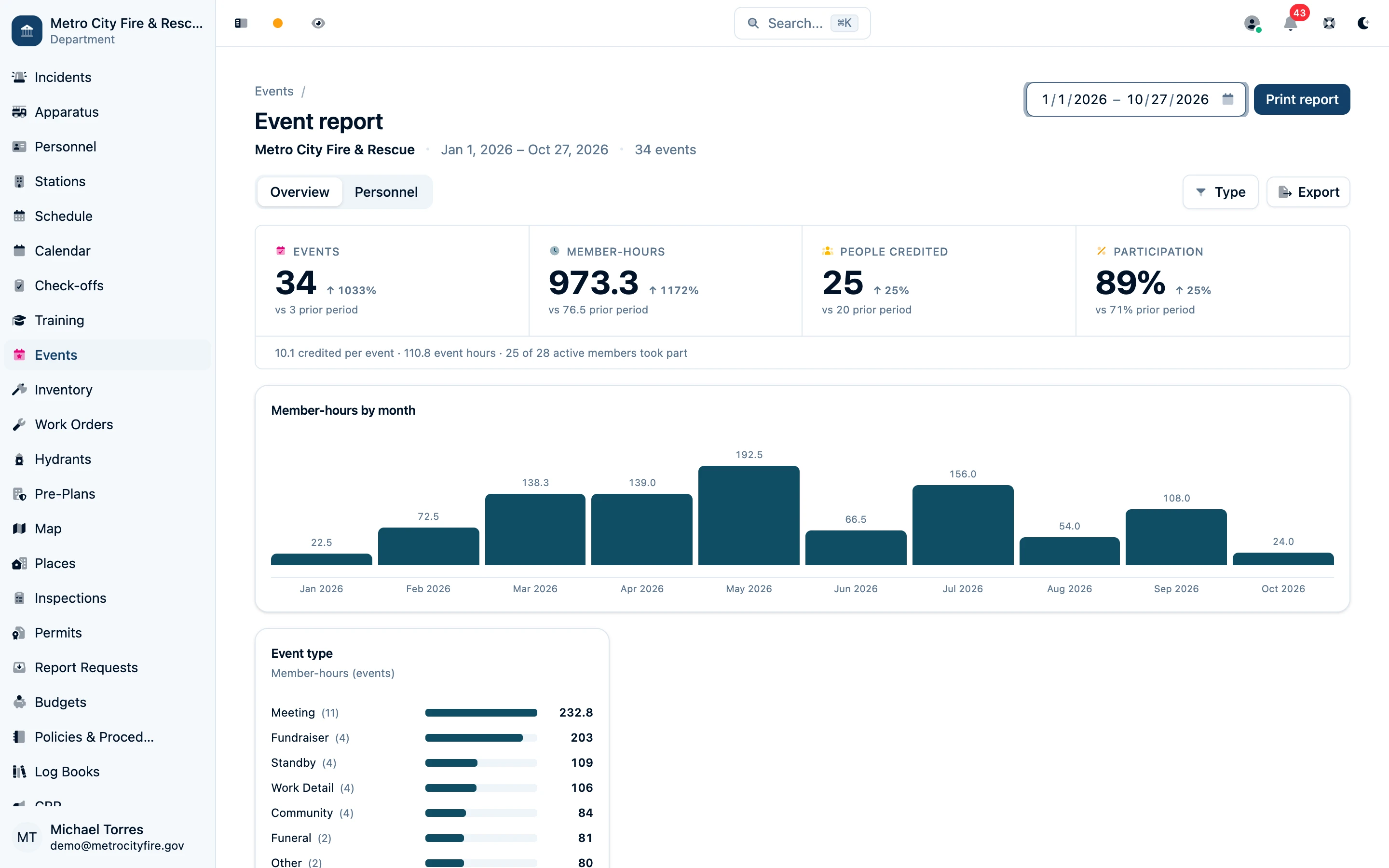
The event report — completed events and member-hours, with the same event filters applied to the prior-period comparison.
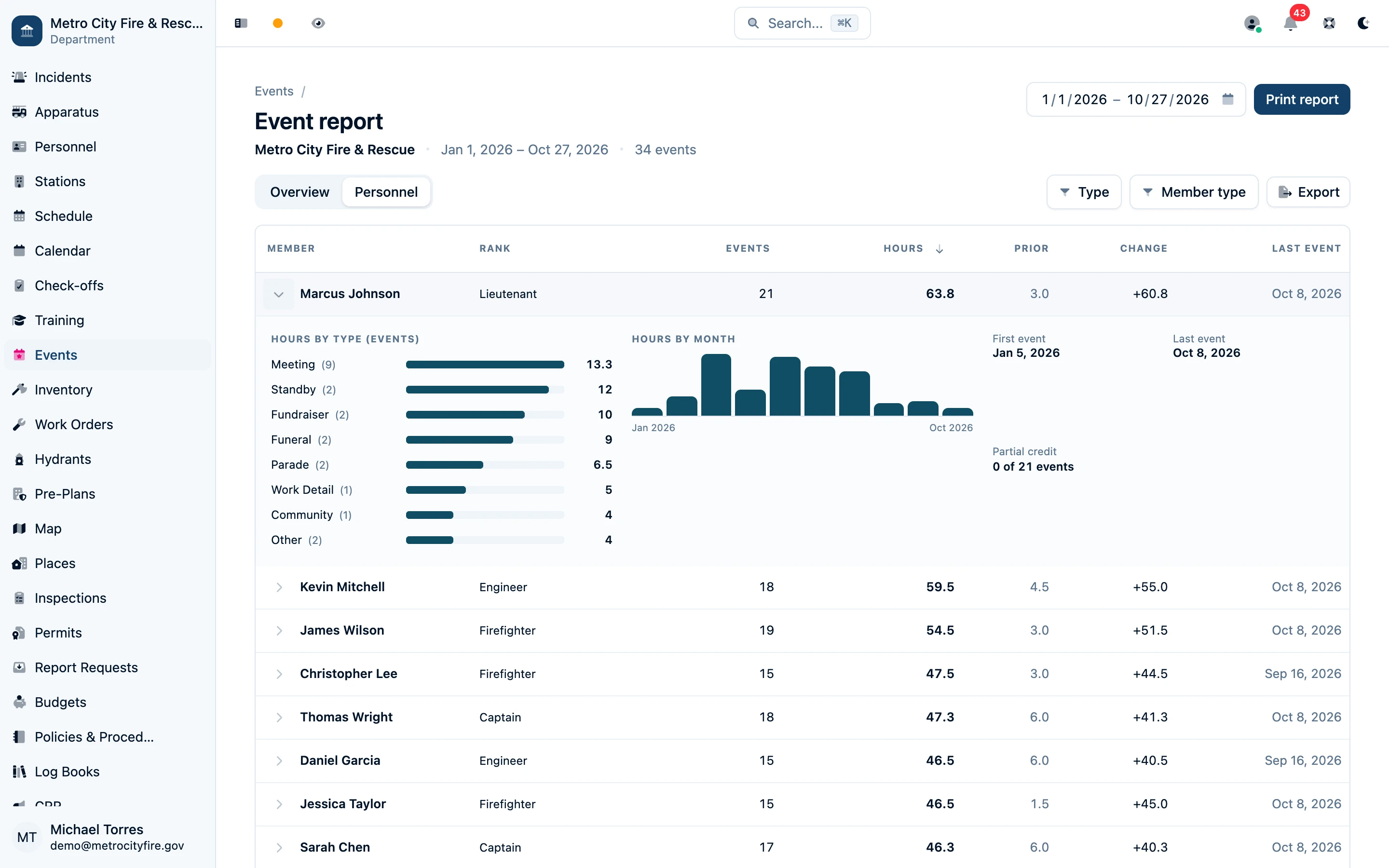
Expand a member to see their events and hours by event type, custom field, and month.
Anyone who can read events can open the report; the workbook also requires access to personnel records. Print report prints the selected view. The event report provides attendance and hours; your LOSAP points program applies the point values, caps, and qualification rules.
Read the report guide for filters, credit rules, and export details.
Filter, Find, and Keep the Record
Filter the events list by status, type, and date range to answer real questions fast: every standby last quarter, every meeting a member missed this year, every fundraiser since spring. And because participation records are part of your department's permanent history:
- Archive, don't delete — cancelled or old events are archived, not erased; they stay readable for audits and LOSAP review.
- Full attribution — every event and every attendance change is tracked with who recorded it and when.
- Permanent history — the roster you certified points from last year is still exactly as you left it.
Ready to Retire the Sign-In Sheet?
Command Established events and LOSAP attendance tracking are included with every fire department subscription. Start a free trial — no credit card required — and log your next meeting's attendance in minutes.